Where the mod menu is at now
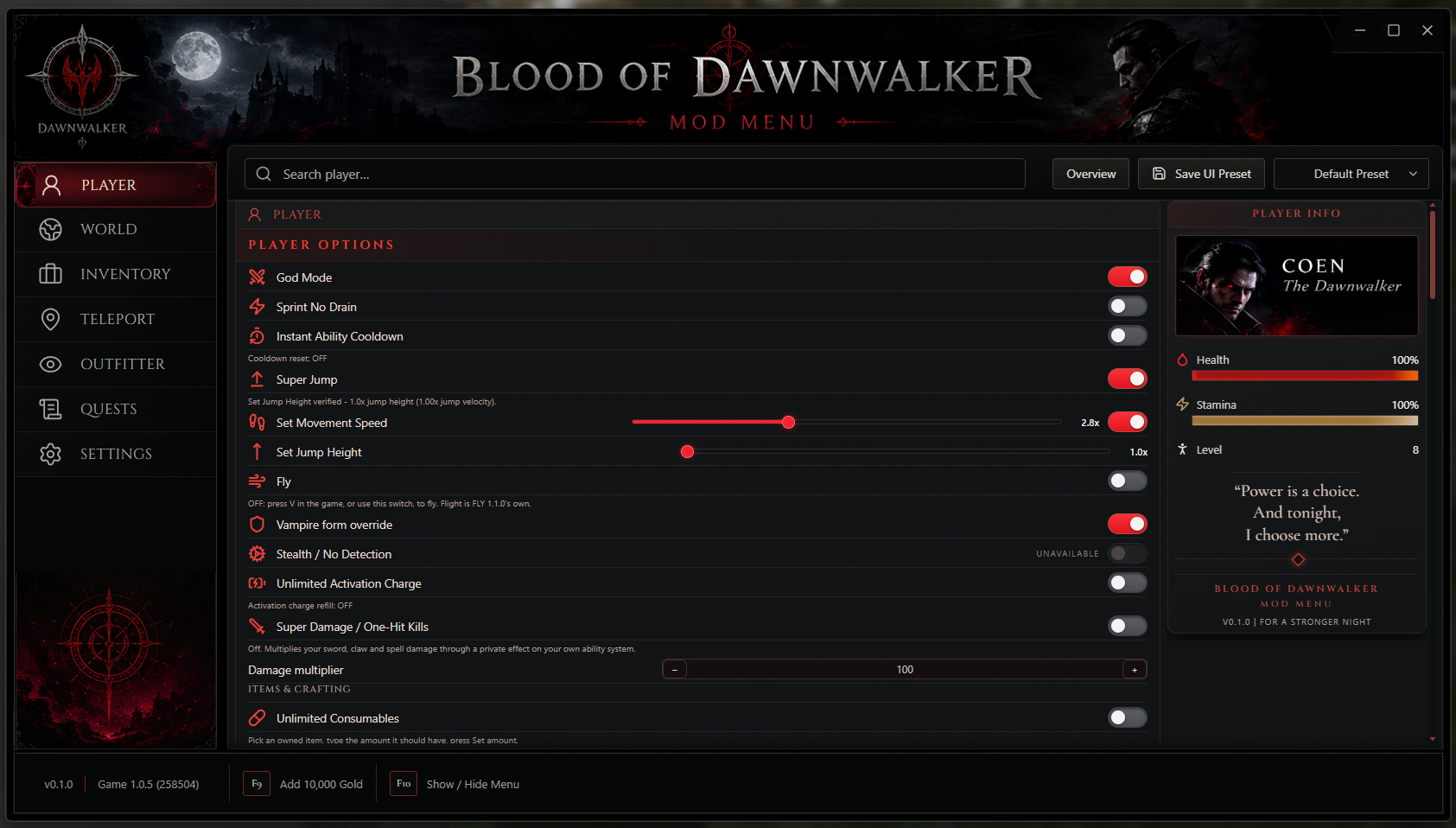
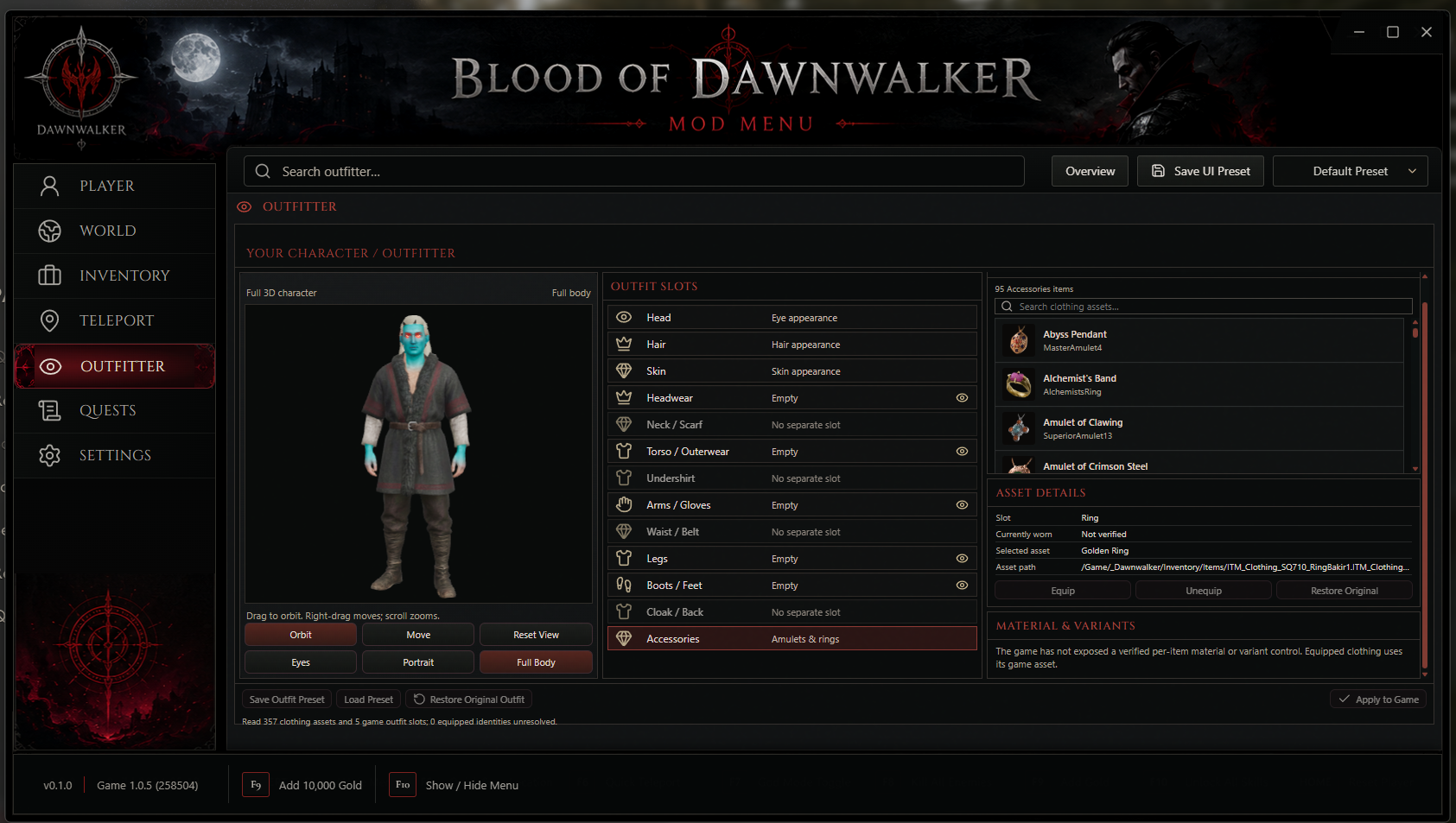
Hey everyone, I wanted to give a bigger update on everything I've gotten done with my Blood of Dawnwalker mod menu so far. The desktop menu connects after you load a save, and I've been going through the controls to make sure they show what the game actually reports when I use them. On the Player side, I've worked on God Mode, health, stamina and blood controls, player level, Super Jump and jump height, Super Speed, and Zero Weight. Super Speed is now working smoothly in game when I'm running, turning and stopping. The sidebar shows Health and Stamina as percentages, and the Carry Weight readout updates automatically so I can see what I'm carrying and whether the limit is normal or Unlimited. I've also added combat options for damage, cooldowns, activation and parrying; inventory and progression tools for items, currencies, XP, skills and respecs; and world controls for time, game speed and saved-location teleporting. There are eye, hair and skin options, quest journal readback and reminders, and a save editor that backs up a save before making changes. I've spent a lot of time on the Outfitter too. Eyes, Hair and Skin have their own rows, and the outfit slots control a searchable browser with actual pictures, names and IDs for 357 clothing items. Selecting Boots and Feet shows footwear, selecting Legs shows legwear, and the list stays with the slot I picked. I cleaned up the layout so the Outfitter fits on the page, made the Player Level selector smaller, improved the connection and shutdown messages, and kept testing the setup and restore process as I went. I'm still working on clicking clothes to equip them in game and getting those outfit changes to show on the character preview, so that part isn't finished yet.
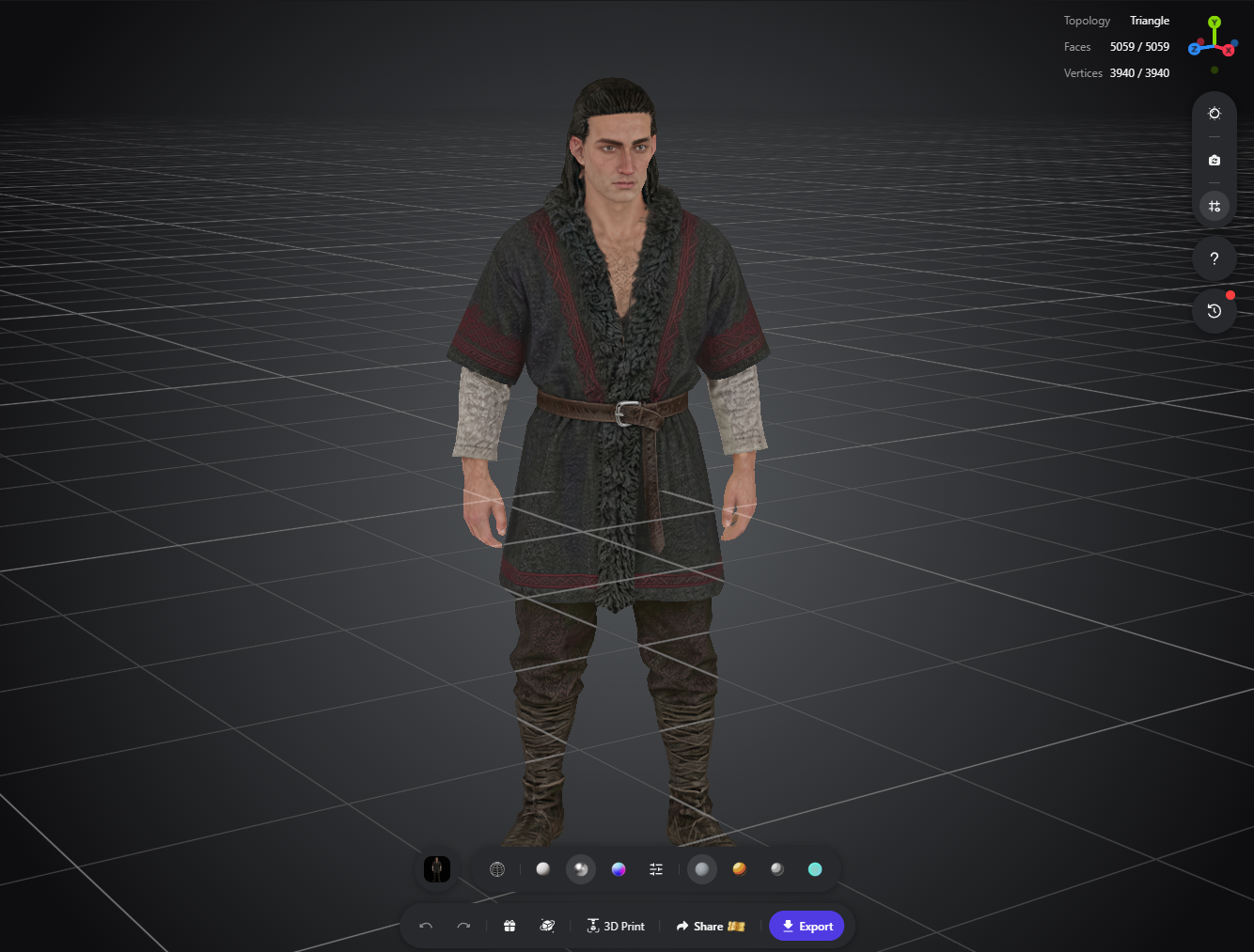
I've also been working with the full-body 3D character model for the menu preview, checking the look and materials as I go. The video here is just some testing I've done so far on a few things. I can't show more of Fly yet until I get authorization.
I want to make this the best menu it can be for the community. I'm taking my time with the parts people will actually use, checking what works in game and fixing what doesn't. If something is still being tested, I'd rather tell you where it's at than call it finished too soon. I want you to be able to follow the progress here and see what I've really gotten done as I keep working on it.
Select the image to see it larger. Use the arrows to look through all three.
The foundation I have built
I started by figuring out what the game actually exposes. That meant checking the supported Steam build, finding the current game objects, trying small changes, and reading the result back. Some early attempts crashed or stopped matching after a game update. I kept the working parts, rolled back the bad ones, and built the menu around what I could verify.
The menu and connection
I have a desktop menu that connects to a loaded save and shows when the game is ready. I built the bridge between the interface and the game runtime, added acknowledgements and reconnect handling, and made failed or unavailable actions visible instead of pretending a click worked.
Player and combat controls
I have put God Mode, resource controls, level, movement, jump, Zero Weight and combat options into the menu. Speed has had its own live movement testing. Other controls still depend on the current save and game state, so I keep those limits visible below.
Inventory, world and quests
I have added item and currency tools, XP and skill controls, time and game speed options, saved locations, quest readback and reminders. The reminders keep tracking through hiding, minimizing and reopening the menu.
Saves and setup
The save editor backs up the selected save before changing it, and file writes request a fresh check that the game is closed. I also built a Windows installer for the desktop menu and matching runtime. Earlier exact installer checks covered install, repair, uninstall and restoring the tested files and saves.
I also spent time making the menu easier to use. I cleaned up repeated switch text and raw diagnostic messages, adjusted the layout for smaller screens, worked on the connection and shutdown messages, and checked that the character preview releases resources when the menu is hidden.
What I got working most recently
- Super SpeedWorking in live movement. I tested running at different speed settings, turning and stopping. The later live runs held the selected speed without the pulsing I saw earlier, and stopping returned movement to zero.
- Player readoutsLive numbers that are easier to read. Health and Stamina now display as percentages. Carry Weight refreshes automatically and shows the carried amount and whether the limit is normal or Unlimited. The latest display cleanup was packaged and checked in the menu; its final loaded-save visual check is still on my list.
- OutfitterA real clothing browser inside the menu. I have 357 clothing records with pictures, names and IDs. The outfit slot you select controls the list and search. Eyes, Hair and Skin have their own rows, and I tightened the layout so it fits better without the extra outer scrollbar.
- 3D character workA full-body character model for the preview. I have been working with the model, checking its materials and bringing it into the menu viewer. The screenshot above shows that modeling work. It does not mean every clothing item can already be equipped or shown on the model.
- Testing and recoveryI keep checking the parts around the controls too. I have tested connection recovery, normal shutdown messages, package contents and save preservation. The old installer tests are useful evidence, but a newer package still needs its own exact checks before I call it ready.
What I am still working on
The biggest Outfitter job now is making a clothing selection actually equip in the game, reading back what Coen is wearing, and making the full-body preview show that same outfit. Browsing the 357 items works, but the equip buttons and outfit preset actions are still held back while I verify the native change and a safe way to undo it. I do not want a picture in the menu to claim an outfit changed when the game did not change it.
I am also continuing to check controls in the game states they need. God Mode is in the menu, but I am still checking what damage it actually blocks on this game build. Turning on its switch alone is not proof that Coen cannot be hurt. Some later effects cannot be fully tested from the early save I have used so far. Timeless Court Activities has a safe refusal path when no supported activity is open, but I still need an open activity to prove the time-free completion effect. Photo Camera, permanent blood damage and Shrine effects need suitable later-game states too.
I am still investigating the intermittent startup stall. It has happened even without the active menu, so I am not calling it fixed just because another launch worked. I am also keeping the unsupported independent eyebrow palette out until its visual result is actually accepted. The small natural hairline patch in the preview is still a known model material limit.
The supplied video is some of the testing I have shared. I am waiting for authorization before showing more of Fly. I will add more footage when I am allowed to show it.
What I want to finish next
- 01Finish outfit changes. Make item selection equip in the game, verify the equipped identity after the inventory changes, and make Restore Original work before enabling the buttons.
- 02Match the 3D preview to the game. Show the actual equipped outfit on the full-body model, test different slots and materials, and make sure the preview can recover when a selection fails.
- 03Finish save-dependent checks. Use backed-up saves with the right quests, court activity and later-game states to test the controls I could not fully exercise yet.
- 04Recheck the full package. Confirm the exact game build, rebuild the current installer, check its contents, and run the install, repair, uninstall and save-preservation checks on that exact file.
- 05Share more when it is ready. Keep updating this page with real testing results and show more Fly footage once I have authorization.
Where the release stands
The earlier tested package targeted Steam build 25232147, game version 1.0.5, CL-258504 on Windows x64. That testing covered a real installed menu, a connected save, an exact installer cycle and preservation of the tested saves. I have kept working on the menu since then, so the old package checks cannot stand in for a new build.
The installer is unsigned. I am not putting a new download or release date here until I have checked the exact file I would share and the game build it supports. I want the page to show what is working now and what still needs testing as I go.
Credit where it is due
I built the menu, but community work helped me research the features. I wanted the credits here to show the people and their pictures just like they appear in the menu, with links back to their own pages and mods.
Built by

cyberfox1337x
Full Stack Developer. I built the desktop menu, installer, game integration and this progress page.
Community findings and ideas




nectarines
Stamina and Sprint Tweaks helped me research the sprint and stamina controls.

KZekai
Console Enabler and Mod Loader helped me research the console and mod loading.

FullTimePatriot
Blood of Dawnwalker Save Editor helped inspire the save editor workflow.


bruender09
Timeless Court Activities helped inspire the Court activity time controls.
UE4SS is the work of Narknon and contributors. The mod menu framework came from Matthew Arvidson, also known as mattdavida, and the form controls include work adapted from Dawnwalker Form Toggle contributors. The shipped software keeps the required notices for its other dependencies.
Blood of Dawnwalker Mod Menu · cyberfox1337x
Roadmap updated September 28, 2026
Latest progress and media added September 27, 2026
Back to the top · Sons of the Forest build notes · Agefield High build notes